Editor Omnibus
Have you ever found yourself wandering through a hardware store admiring the shelves of tools?
Have you found yourself fantasizing about possessing a complete collection of cordless powertools, even though you know you don't need them? A complete woodworking shop, even though you don't even do that much woodworking?
If so, it doesn't mean you are insane. It just means you are a male, or an engineer, and probably both. Which means that you LOVE TOOLS. Merely holding one in your hand seems to multiply your power.
In the same way, programmers love their tools. We love achieveing that state of coding productivity where ideas seem to move straight from our minds, through our fingers, and into our computers like a flow of water. We feel a sense of raw power from the tools that enable this, and we become attached to them as we invest time into learning how to make the most of them. Many of us make a habit of sampling new tools and techniques, always looking for something that can enable that state of flow just a little more readily.
I include myself in this category. I am (ahem) rather a fancier of programming tools. I certainly haven't used them all, but I've used enough of them to get a pretty good sense of what's available out there. Really, what I'm writing here is the omnibus cross-editor comparison that I wished I could find when I got started programming.
The traditional divide in the editor world is between text editors, and Integrated Development Environments (IDEs). To me, that seems like an oversimplification. Rather, they seem to fit on a spectrum between two views of code. On one side is the reductionist view: That code is merely text, and is best manipulated as such. The other view sees a programming project as an integrated whole. In this view a programming project is akin to the project files from other rich creative environments, from Photoshop and AutoCAD files to Word documents and Powerpoint decks.

The dumb text editors
Notepad, Nano, Textedit, and similar
So.... I'm trying to compare these editors in a reasonably evenhanded way. Us programmers sometimes are tempted to make too big a deal about our tools. We can forget that they don't matter, as long as the code works. There are brilliant programmers in the world who use these and have never needed anything else. But seriously, if you are using one of these as your primary coding tool, you're missing out. These are the ones which make no distinction or almost no distinction between code and any other sort of text. They seem to really be more intended for scanning through log files and making quick edits than for serious work. There's no disadvantage to using a real programmer's text editor, and many advantages.
The Programmer's text editors
Notepad++, Atom, Sublime Text, Textmate, Vim, Emacs, and many, many others
I think the name "Notepad++" best captures the spirit of these. At their heart these are simple text editors in the same vein as notepad, but designed for power users writing code. Some key features which are pretty common across them:
Syntax highlighting and auto-indent: All of these editors can perform syntax highlighting in a wide variety of programming languges. It's usually implemented with regular expressions rather than a deep interpretation of the underlying language, but it still makes the code far easier to read. Automating the correct line indentation for your given language is another simple feature which is a massive timesaver.
Text editing: They have a lot of power user features for text manipulation, regardless of whether you're working with code or not. They will have an array of keyboard commands for things such as "Delete from the cursor to the end of the line", "Jump to matching parentheses", "Jump to the next instance of the word under the cursor", "Paste from clipboard history", and dozens of others. Individually they would be mere novelties, but in aggregate they allow you to navigate through your code while rarely touching the mouse.
File navigation: Unlike Notepad, A good programmer's text editor will be able to work with an entire project directory at once. They support having files open in multiple tabs, and even viewing files side-by-side in a split pane. In addition, they let you perform searches for text patterns or filenames across your entire project directory.
Extensability
These editors are all highly customizable. They all are host to a rich ecosystem of plugins created by a community of volunteers. They allow you to add features to your heart's content.
Which One?
I haven't come close to sampling all of the coding text editors out there, but of the one's I've tried, Sublime Text is my personal favorite: It's what I'm using to type this post right now. It's got all the features above and more, a rich community of plugins, and on top of that, it is BLAZING fast, even with very large text files. It is proprietary software, with a perpetual license priced at $70, but it is completely worth it. For those of you who are opposed on principal to paying for software, Atom seems like a very nice alternative, and also seems to have such a strong plugin community that I could see it eclipsing Sublime Text in the future.
The IDEs
IntelliJ, Eclipse, Visual Studio, XCode
In comparison, IDEs (Integrated Development Environments) offer a much larger set of features. A programmer's text editor, despite its many features, is really there mostly to manipulate the text of your source code. Other tasks like running your code, build processes, debugging, and source control, tend to be handled through separate utilities, most often on the command line. In contrast, an IDE provides an integrated whole, with menus and panels and wizards which help in performing all of these tasks. The typical IDE will run some sort of background interpretation of your code as you write it. This allows them to be helpful in ways which are out of reach to most text editors. An IDE can take a particular function and not only let you jump to the function definition, but let you look for all usages of that function. It can rename a class property across the entire project, and automatically perform refactorings while leaving the code functionally identical. A really good integrated debugger is a joy to use, and makes command line debuggers and log statements feel clumsy by comparison. A good IDE will provide a powerful autocomplete engine, such that if you start to declare a new Object, it will pop up a little window of suggestions of available classes, and filter it as you type. If you choose a class which is not available in the current context, the IDE will insert the correct import statement at the top of the file. When you type the Object name followed by a dot, the IDE will list all the methods and properties available on that object, along with a little documentation.
To augment all their helpful features, IDEs will start to add more files to your project; files which are not meant for human editing. In lightweight IDEs, these will be fairly minor: Just a few indexes, and a place for the IDE to save information about window layouts and breakpoints. They aren't an integral part of your project. But in heavier IDEs, these can include layouts of your user interfaces, mapping to your database, or parts of your build process. These can put you in a situation where your project is dependent upon the IDE, such that it won't build, or parts of it aren't easily editable, in any other environment.
Which one?
There's much less analysis paralysis in the world of IDE's: Usually there's one IDE which is a sort of default for your given language: Visual Studio for .net languages, Eclipse for Java, and XCode for iOS. I've used all of these at least a little bit (And Visual Studio a lot), and to me they all seem quite good, and all have a few frustrations. A surprising number of IDEs have good support for Python and Node. There is also a remarkable company called JetBrains, which does something a little different. More about them later.
The Drag-and-drop editors (Labview, Scratch, Excel, Wix)
There are some editors which take things a step farther. Some IDE's (I'm thinking Visual Studio and XCode) give you the option of creating your application by laying out components in a drag-and-drop editor, and only writing code to wire those components together. There are a few environments that take that a step further, where you create your software through a graphic user interface. The mouse, rather than the keyboard, is your main tool. I find these are usually to serve some sort of niche of non-programmers: Labview is targeted at electrical engineers, and Scratch at programming beginners. I would argue that Microsoft Excel is also a programming environment of this type.
It seems that you lose power from this approach. Compared to code, these designs don't seem to scale gracefully. Text is easily edited and moved around, while mouse driven-designs are more rigid. Text reads linearly, while mouse driven designs tend to grow into complex spiderwebs. Text is easily source-controlled, while mouse driven layouts are not.
It seems like there's an interesting conclusion from this: You sacrifice power by embracing either the code-as-text or code-as-project viewpoint to the exclusion of the other. It seems, then, like the best programming experience is going to come from a happy medium between them, which embraces both viewpoints as the situation merits.
Reasons you might still want a text editor over an IDE
So, just from the description above, an IDE sounds like it would be the obvious choice, right? Who could say no to all those features?
A Fable
There is a tongue-in-cheek programmer koan which I've heard bandied around a few times. (In the course of Googling, I failed to find the original source from this one. Please fill me in if you know it):
Once an apprentice came to Master Joshu and asked, "Master, I am overwhelmed by the number of tools I must understand. Between the compiler, the text editor, the debugger, the linter, and source control, it is too much for me". The master looked on him with compassion, and admitted that even he sometimes had trouble keeping track of them all. A few days later, the apprentice returned, saying, "Master, look at this new development environment I found for us to use. It integrates all of the other tools, so that we only need one tool for everything". At this, Master Joshu's countenance grew dark, and he slapped his apprentice, saying, "Fool! You know I already have many tools to manage. Why would you burden me with another?"
In that moment, the apprentice was enlightened
In other words, knowing an IDE doesn't save you from needing to understand the tools that it integrates. Very often, the IDE is just a thin facade on top of a command line tool, and even hides some of the more interesting features of the underlying tool. Since they are really many tools in one, there's a risk that some of the tools are neglected by the IDE creators. For example, the text editor is only one component of the larger whole. For the IDE developers, it is only one feature among many, and may not be crafted with the same care as a pure text editor. At the very least, it is likely to be less powerful in terms of keyboard commands for editing text, simply because many easy-to-reach key commands are taken up by other tasks.
As a consequence, IDE's tend to be a little less adept at making every feature accessible from the keyboard. It's more common that you need to interrupt your flow to find some feature in a menu, or configure it with the mouse, which is a frustrating thing for text editor veterans
With all the things they do, all the indexing, live interpreting, and analyzing your code, IDEs tend to be big programs. A single instance of Visual Studio consuming a full gig of memory is not uncommon. The experience of using them isn't particularly slow compared to other large programs, but even a few millisecond's delay switching between files can add just a little to your frustration, particularly if you are used to a lightweight editor
The IDE's rich code comprehension features come with a small tradeoff. A text editor's syntax highlighting rules are simple enough that the typical editor ships with rules for dozens of languages. By contrast, most IDEs will only work with a subset of languages which the IDE creator has taken the time to integrate. This adds an extra burden in trying out new languages, that you have to tackle them without the help of your favorite environment
The IDE vs text editor debate is, I think, more a matter of which tradeoffs seem most tolerable to you, with no right or wrong answer. My sense from having known a good number of very good coders, is that most of them find some workflow which is a hybrid between IDEs and text editors. If they are mainly text editor people, they load their editor with plugins to borrow some IDE features. I also get the impression that all but the most hardcore of text editor people will switch over to an IDE on occasion, if they are working in a language with particularly strong IDE integration (Java, .net, or iOS), or if they are working on tasks which are particular strong points of IDEs (e.g., debugging and refactoring). On the other hand, if they are mainly IDE people, they still seem to prefer switching over to the command line for tasks which are done a little more readily that way (e.g. package management, build processes, source control). They seem to also keep a text editor around, which they use for quick browsing, scratch files, and intense text surgery.
There are also a number of mavericks which don't seem to fit cleanly in either camp, which deserve special mention:
Special Mention: Emacs and Vim:, the Ancient Ones
Follow me back to the days of yore, long before Windows, before the internet, before GUI's. In the old days, the only interface your computer offered was a keyboard and a command prompt. Even then, programmers built sophisticated tools for themselves. Many would argue that the power of these tools has never been exceeded, even in the present day. In terms of features they bear a lot of resemblance to coding text editors like Sublime and Atom, but they toss inviting interfaces and friendly learning curves out the window, in favor of pure keyboard-driven power.
A side effect of their learning curves being so steep, is that programmers become deeply invested in them. They feel like well-worn gloves if you are used to them, and if you are not they are horribly frustrating. You have to consult the internet to even figure out how to exit them. It's probably no wonder, then, that Emacs vs. vi (the predecessor to Vim) was the subject of flame wars older than the internet. Even today, it's hard to find an objective comparison of them, or a comparison between them and modern editors.
Emacs:
Now, this is one where I have to admit my ignorance. I've used Emacs for a class once, and got fluent enough with it to navigate through code with reasonable smoothness, but I have never delved into deep customization. Any true Emacs user will tell you that is not even scratching the surface. Emacs encourages you customize every aspect of it to your whim. True Emacs users seem to build up a repertoire of dozens, even hundreds of commands and scripts and modes mapped to the key combinations they find most convenient.
I admit, I'm a little confounded by Emacs. Many people speak of it as the ultimate editor, where the very act of customizing it deepens your understanding of code, where deep mastery makes code flow as swift as thought. Anecdotally, it seems that if you held a gathering of the world's greatest programmers, you would find yourself with a room full of Emacs users. But personally, I don't quite see it. From the actual capabilities people describe, it sounds to me like a fine editor, but not particularly better than say, Sublime Text. I'm left wondering: Is the hype just a holdover from the '80s and '90s when Emacs was head and shoulders above any other editor in existence, with momentum sustained into the present by force of habit and the Ikea effect?
Actually, I suspect that its the programming equivalent of that neighbor who drives his Mustang from the 60's, which he spends every Saturday fixing.

It's a perfectly workable car by the time he's done with it, and it's got a flavor of fun that you really can't find in any more modern car. But on the other hand, by just about any objective criteria, he would get a lot more bang for his buck (and effort) if he just bought a BMW. But on the gripping hand, the very act of tinkering gives him an understanding of automotive mechanics which really couldn't be learned any other way. If that's the case, I have a lot of respect for Emacs users, but it's probably not my thing. But, if you are an Emacs power user reading this, and you think I'm missing something, please leave a comment and let me know why I should try it again. I would be happy to be persuaded.
Vim:
By comparison, Vim is a much simpler editor. It has a reasonably strong plugin ecosystem, but it's nothing compared to the customizability of Emacs. Where Emacs actively encourages you to augment it by writing your own plugins and utilities, vimscript is arcane enough that most users seem to just install a few popular plugins and keyboard customizations, and leave it at that. But where Vim really shines is in raw text editing power. When you hit the escape key in vim, it enters a different mode. The whole keyboard no longer enters text. Instead, every key, both upper and lower case, is mapped to some sort of editing command. These can be strung together at touch typing speed, to allow for fantastic fluency of navigating and editing text. You never need to move you hand over to the mouse, and you don't even need to stretch your fingers to the Ctrl or Alt keys. Do you want to go to the next quotation and delete the quote marks surrounding it? f"ds" (f" jumps the cursor to the next quotation mark. ds" is a combo for delete-surrounding-quotes). Forgot to capitalize the current sentence you're typing? (w~A (The open parentheses jumps to the last period. w moves forward to the first word of the next sentence. ~ toggles the capitalization of the letter under the cursor. A jumps to the end of the current line and reenters editing mode). In Microsoft word, any of those edits would involve painstaking mouse moves to select just the right letter, or long pumping on the arrow keys. In Emacs or Sublime, you can do it from the keyboard, but it would take a lot of hand stretching with the ctrl and shift and alt keys.
Special Mention: Visual Studio Code, the hybrid
This is a new challenger in the field, which is gaining a lot of steam. It's a creation of Microsoft, released concurrently with their cross-platform .net core runtime. At it's heart, it is a text editor very comparable to Sublime or Atom. But it's got something extra: Microsoft also created several plugins for their preferred languages, which for those langauges bring the most valuable features I associate with IDE's: Intelligent code completion, integrated debugging, navigating to symbol definitions and references, and intelligent refactorings. Furthermore, it seems like Microsoft created an API (dubbed the Language Server Protocol) which makes it relatively easy for third parties to write similar extensions for other languages. At the time of writing, it seems that Microsoft has IDE-like support for Javascript, Typescript, C#, C/C++, and Python, while third parties have added some decent-looking support for PHP, Java, and Ruby.
I haven't used it that much yet, but this one looks like it has potential to provide the best of both the text editor world and the IDE world. I've started to notice many of the developers I respect switching to it, and I am eager to try diving deeper
Special Mention: JetBrains, The IDE specialists
To the best of my knowledge, JetBrains is the only major company in the world which specializes in making IDEs. They've got a product line which is a little different from anything else out there. Their flagship product is IntelliJ IDEA, a popular IDE for Java. But they take it a little farther. They take the core platform of IntelliJ, and use it as a foundation of an IDE for just about every major language. At current count, they make separate IDEs for pure Javascript development, for Ruby, Python, PHP, Go, C++, and SQL (The functionality for any of these is also available as a plugin to IntelliJ). They even make an iOS IDE to act as a supplement to XCode. For years they've been the makers of Resharper, a plugin that brings a lot of the best features of IntelliJ to Visual Studio, and just recently they released their own full-fledged .net environment.
Together, the JetBrains products seem to ameliorate a lot of the issues I mentioned with IDEs. Between their many products and plugins, they provide a consistent IDE experience for just about any language out there. They are unusually good about making functions available throught the keyboard, and include a fuzzy search of available commands. They add a few hidden files to your project with build configurations, indexing, etc., but they never seem to do anything which makes it difficult for your project to run perfectly well in a different environment, and they interact very nicely with command line tools.
JetBrains tools are probably best known for their refactoring features. But in my opinion what they do best is navigation through large projects. With a simple key command, they can do all sorts of searches: Search by file name, by symbol or class name, by recent files, plus a "search everywhere" that combines all of these. Other IDEs implement similar features, but the JetBrains engine is so fast, so comprehensive, so helpful in the little details, that it is simply more useful. Just as an example: Here is the window for doing a full project text search:
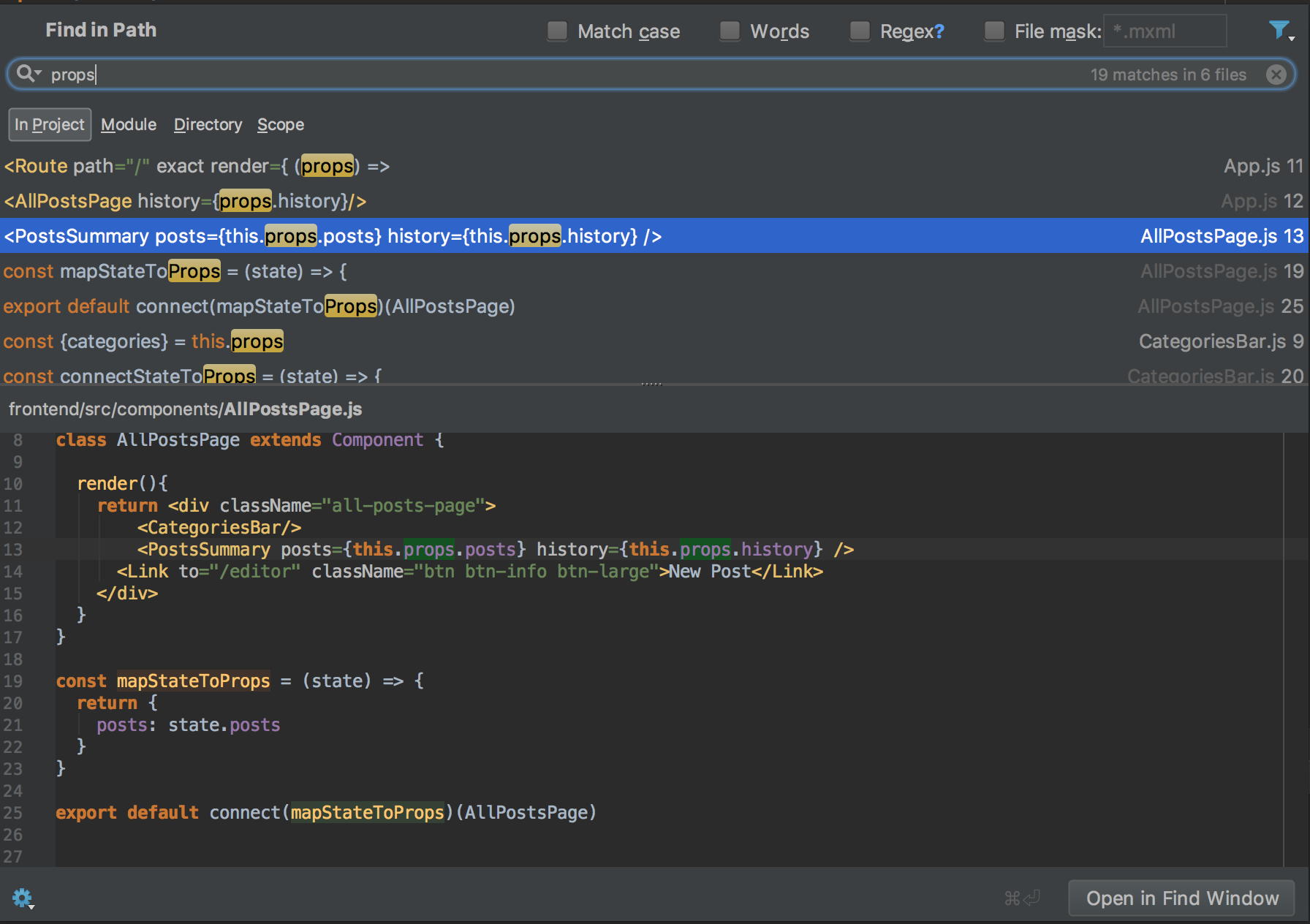
It does all the searching things you would expect, but not only does it give a nice preview of the context for your search results, it allows you to make edits inside the preview
Another feature I'm very fond of is their integration with Git. I'd expect a good IDE to give a little sidebar indicator of which lines of my file have been modified since the last commit. But in a JetBrains environment, if you click on on that tab, it shows you what has changed, and gives an option to revert only that chunk.
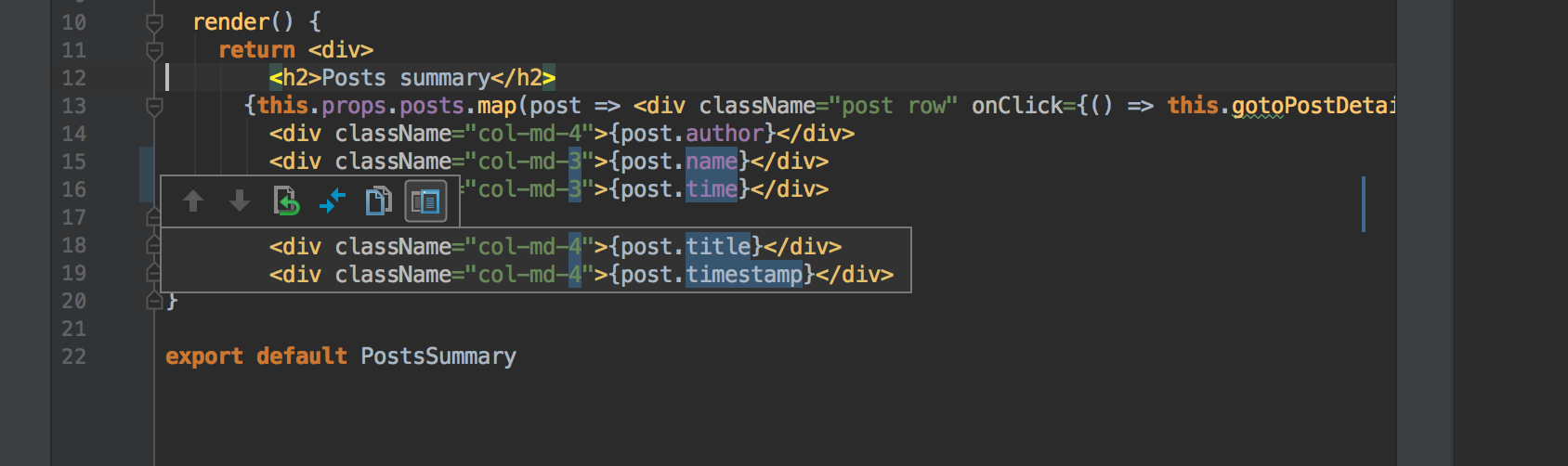
This is not an isolated sort of thing. Everywhere I turn, I seem to find some unobtrusive, elegantly crafted little feature which makes coding just a little more enjoyable. A full subscription to the JetBrains line of products costs a little money, But I find it completely worthwhile
Special Mention: Cloud IDEs (Cloud9, Eclipse Che)
It has appeared for a while that the future of computing is in the browser. Sometime in the last decade, we've switched to a strange state where we only use desktop applications for specialized purposes, and most of our computer usage takes place inside of Chrome. With steady improvements to the browser-based versions of desktop mainstays like as Microsoft Office and Adobe Photoshop, I only expect this trend to continue.
It's no surprise, then, that people are also taking stabs at browser-based coding environments. Of these, I've mostly used Cloud9 IDE, and it seems like Eclipse Che provides a similar, albeit Java-centric, experience.
I'm very impressed so far. For no charge, it seems like Cloud9 will spin up a minimal Docker container to serve as a clean environment for your project, and then overlay it with a very pleasant, lightweight, browser-based IDE. In terms of features, it seems roughly comparable to the likes of VS Code. I highly recommend trying it out. While it's not yet responsive enough to make me want to switch to it as my main development tool, it has one killer feature: collaboration. Those docker containers support multiple, simultaneous users. In other words, I can be working on the same project at the same time as a friend in another state. We each have a cursor, and we can watch each other edit the code in real time. It's as seamless a shared world as playing World of Warcraft together.
Thus, Cloud9 has become my favorite tool for teaching programming, and I bet that distributed teams could benefit from it tremendously. I'm excited to see what the future holds for it.
"So David! Now that we're at the end of this, which side are you on?"
Honestly, having used a few of these, I think it really IS a matter of personal preference. I obviously like some of these tools more than others, but if I'm objective I think it's a Pareto principle kind of thing: You get 80 percent of your productivity enhancement from the 20-ish percent of features which are common across most text editors and IDEs to the right of nano on the chart. I think beyond that, increased productivity comes less from amazing features, and more from mastering the keyboard shortcuts and customizations from your chosen environment. Go with whatever you find most pleasing!
"That's very Zen of you. But seriously, I'm looking for recommendations. Which is your favorite?"
It's probably obvious from my writing about Vim that I'm a big fan. But, I'm not as thrilled about it for project navigation. There are certainly folks who build it up into a full IDE by piling on enough plugins, but that approach feels clumsy to me.
It's probably also obvious that I'm a big fan of JetBrains products. But, as well-crafted and helpful as they are, they don't have quite the same features for pure text editing as a dedicated editor like Vim, Emacs, or Sublime.
My solution is to combine the two. One advantage of Vim I neglected to mention is that having the Vim keybindings wired into your muscle memory is one of the most portable computer skills in the world. Not only is it available wherever there's a unix-like command line (it's part of the POSIX standard), but almost every quality text editor or IDE in the world has a plugin available to emulate Vim keyboard commands (Even Emacs!). In fact, I almost never use actual Vim. I do most of my development with whichever JetBrains IDE supports my language of choice, combined with their IdeaVim plugin. To me, this gives the best of both worlds: All the rich features and project navigation of an IDE, but with the text editing and text navigation powers of Vim. They fit together very conveniently on the keyboard. I can use use Vim's normal (ie, editing) mode for local edits, and all the commands mapped to the Ctrl/Command/Alt for IDE for project-level operations. I sometimes supplement it with Sublime Text + Vintage plugin, mostly as a scratchpad. For .net development, I've used Visual Studio combined with JebBrains Resharper and VsVim for years, which also seems to work pretty well. I don't know if all of this is the best programming experience in the world, but it gets me over the threshold where the tools always seem to be helping me and never getting in my way.
And, I'm always trying new ones. I particularly want to dive deeper into VS Code, which looks like it provides all the IDE features I really want, while still being light and nimble. I also want to see if I can ditch Visual Studio entirely in favor of Rider.
And who knows! I might take up Emacs someday.
Subscribe to Axten Software
Get the latest posts delivered right to your inbox

