Bug-Free Software for the Non-Programmer
The Indomitable Sean Stiennon shared this Atlantic Article with me a little while back!
I found it highly thought-provoking, even though I disagreed with most of it. I found it so thought-provoking that I wrote a very long essay parsing it out
tl;dr;
I think he makes a lot of good points about problems in the current state of software, but I'm not tremendously impressed with most of the solutions he offers, which seem to provide incremental improvements at best. A comic strip is worth a thousand words:
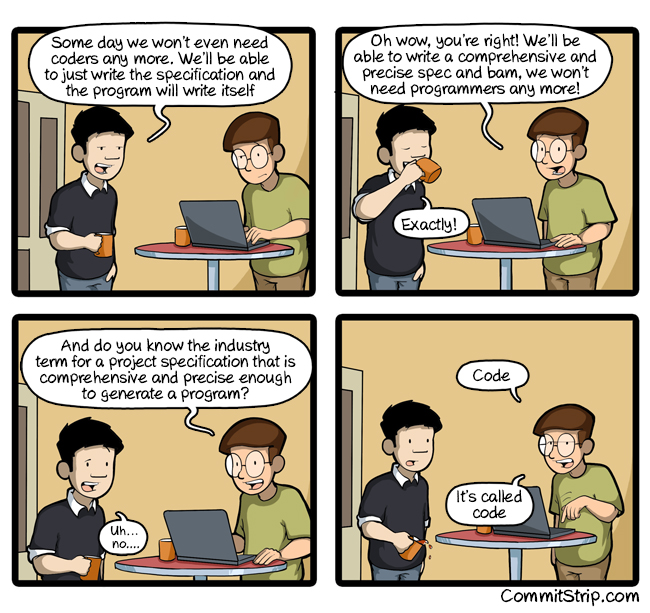
The problem he readily identifies is the sheer horror of how complex our software is, how incomprehensible the inner workings are to anyone who is not a programmer, and sometimes even incomprehensible to the programmers working on it. But of the two solutions he identifies, it seems to me that neither of them really address the core problems of what makes software complicated.
WYSIWYG (What you see is what you get) editors to replace coding:
These have been around in various forms for a long time. They do have a few advantages, among them:
- They are fast to set up and get started
- They are a great learning tool. They offer a less intimidating learning curve for folks who aren't used to looking at code
- They can offer you instantaneous feedback when you make changes to your program
It's the last one which is really valuable. Experienced engineers know that this is one of the most powerful ways to reduce defects: Never go more than a couple minutes without running your code. If it produces a Graphic Interface such as a website, you set up your tools so that every time you save a file, the web page refreshes and you can try out your changes. If it's a more abstract data-in-data-out sort of operation, you wrap it in a suite of unit tests to verify its output, and run those whenever you make a change. I admit, I'm kind of impressed by that tool that Brett Victor demonstrates, which allows you to adjust variables in your code with sliders and see the updates in real time. It's not a revolutionary change, but it seems like it has potential to further improve the speed of the feedback loop.
However, I think that works precisely because it's a tool layered on top of code, rather than a WYSIWYG to replace code. In that particular demo, the author points to a setup where you can drag a slider over the number that controls Mario's jump height and visualize how that affects the jump inside the game. It's certainly useful, but it doesn't address the really difficult part of making the jump work, which isn't playing computer in your head. The difficult part really comes in two problems: precise description and modularity
Let's talk about the precision side first.
You might ask, "How complicated can it be to make a character jump in a video game? You press a button, Mario goes up, Mario goes down. Easy!"
Ah, If only it were that simple. If you build a video game with a jump like that, it will feel frustratingly stiff: Really no fun at all to play. The real requirements for a smooth jump are more like:
Mario's starting horizontal velocity should be equal to his running velocity when the jump button is pressed. Once he is in midair, holding the left/right buttons should allow you to alter his velocity somewhat, though he shouldn't be able to accelerate to faster than his maximum running velocity. His X speed should decelerate somewhat if the player stops holding the forward button. For his Y velocity, he should start with a certain upward velocity from pressing the jump button, but holding it up to a second into the jump should weaken the deceleration of gravity. This allows a higher jump by holding the button longer. At any time, pressing the A button will change the jump into a "spin jump", which has slower velocity, but also a "driftier" fall, which can be described in math as blah blah blah blah blah.
In other words, the real challenge is taking what we intuitively think of as "A smooth jump that feels just right for Mario" and describing in exact, unambiguous detail what that actually means. You could probably design a drag-and-drop interface which would allow you to put all that together, but it wouldn't make it easier to think about. Heck, the plain-English description is an almost incomprehensible wall of text, because the ideas are complex and its trying to squeeze a kind of expression out of English which English isn't really suited for.
Probably the best way would be if we had a specialized language for describing behavior like this. It would have to be concise, with specialized punctuation and grammar to clearly divide up ideas, no room for ambiguity, but still somewhat English-like, enough so to be readable. We already do this for math, and it works very well: We write "2 + x = 4" rather than "x is an unknown number such that when two is added to it, the sum should be equal to four"[1]
That is exactly what a programming language is.
The difficulties of modularity are a little harder to describe.
Ideally, code ought to be composed of simple modules (like, less than 10 lines of code). You then build more complex modules by piecing together small ones, and yet more complex modules by piecing those together. I can't think of a good way to explain that further without doing a little dive into some actual code. Please bear with me, I'll try to make it comprehensible for the non-coder. This is some code you might find in a Mario-esque game game, to make Mario jump. If its written in a modular way, it will look something like this:
//Actual code!  This is javascript, a popular language for creatign websites
//hint for comprehension:  'function' is the same thing that I've been calling a 'module'
//when you see a word followed by parentheses, that is a command to run a module defined somewhere else.
//example: doSomething(5) would mean "run the module named doSomething with the number 5 as an input"

function jump(mario){
	var milliseconds_per_frame = 33
	setInterval(next_jump_frame(mario), milliseconds_per_frame)
}

function next_jump_frame(mario) {
	if (button_reader.spin_button_pressed()) {
		mario.start_spin_jump()
	}
	mario.update_jump_velocity(get_gravity(), button_reader)
	mario.update_position(mario.get_velocity())
	mario.update_jump_sprite()
	screen.draw_character(mario.current_sprite, mario.position)
}
Now, if you don't code, it's not a way of expressing ideas that you're used to. But please, spend a few minutes looking over it. It's really not too bad. It's not that far removed from a plain-English description of how Mario's jump should play out. In English, it would read something like: "Every frame, if the spin button is held, change this jump into a spin jump. Update the Mario's velocity based on gravity and whatever buttons are held down. Then, update Mario's position based on his velocity. Then, draw the next frame of the jumping animation at the new position". These modules are going to be defined somewhere else, and they will spell out in greater detail exactly how operations like "update_jump_velocity" should be carried out.
The same thing, in code which is NOT done in a modular way, would look something like this:
setInterval(function(){
	if(btns & 0b00001000) {
		mario.spinJump = true;
	}
	if(mario.spinJump){
		mario.yv += -4.9 + (btns & 0b00001000 ? 2 : 0)
		mario.xv += (btns & 0b01000000 && mario.xv < mario.xvMax / 2) ? .5 : (btns & 0b000100000 && mario.xv > mario.xvMin / 2) ? -.5 : 0
		mario.x += mario.xv
		mario.y += mario.yv
	} else {
		mario.yv += -9.8 + (btns & 0b00000100 ? 4 : 0)
		mario.xv += (btns & 0b01000000 && mario.xv < mario.xvMax) ? 1 : (btns & 0b000100000 && mario.xv > mario.xvMin) ? 1 : 0
		mario.x += mario.xv
		mario.y += mario.yv
	}
	if(mario.spinJump){
		mario.spriteIndex +=1
		mario.currentSprite = mario.spinJumpSprites[mario.spriteIndex]
	} else {
		mario.spriteIndex += 1
		mario.currentSprite = mario.jumpSprites[mario.spriteIndex]
	}
	screen.draw(mario.currentSprite, mario.x, mario.y)
}, 33)
AAAAAARRRRRRGH
Now, to the computer, it really doesn't make a difference which of these styles you use. They both do the same thing. But to a human, the difference is enormous. Even if you have never looked at code before, it will probably be obvious that the second snippet is far more difficult to follow, with its abbreviated names, its mathematical syntax, and complex order of operations. But there are even deeper problems behind the surface complexity. For instance: You see all the specific numbers in the equations? Just as an example, look at that number "33" on the bottom. If I'm a programmer who's inheriting this code from someone else, I'm left wondering, WHY is it 33? Will it introduce a subtle bug which will bite me in the britches later if I change it to 32? What if it's a mistake: The original guy meant it to be 32, and fat-fingered the key? This code doesn't give us any context for figuring that out. This same problem is repeated in just about every number here, and there are quite a few numbers
Compare this to the modular code, which actually defines what that number is: its the amount of time, in milliseconds, that should pass between each frame of the jump animation
Another more subtle issue is the amount of repetition that's going on here. Look at lines 27-37. There's a reasonably complicated math formula, which is repeated twice for two different kinds of jumps, with just sllllllightly different numbers. As the program grows, the programmer will presumably copy-paste this formula and then tweak it for other kinds of jumps (slight variations for say, jumping off a springboard, jumping in the low-gravity level). This sort of thing is where many, if not most, software bugs come from. Somewhere in the course of development, that jump formula will inevitably need to change. And when that happens, that change will also need to be copy-pasted in a bunch of different places. And inevitably, at some point, the programmer will forget to make that change in one of the places. And that is when a bug gets introduced.
Another example is in all the little bits of code that look like "if(btns & 0b00001000)". If you're used to reading code, you could probably infer that it checks whether a particular button on the game controller is pressed. But what if we decide to change the way we scan the buttons? If that code is hidden inside a module, like
function spin_button_pressed() {
	return btns & 0b00001000
}
Then all we need to do is change the definition of that module in just one place, and we're done. Otherwise, we have to do a massive find-replace of every "btns & 0b00001000". Inevitably, we'll miss it somewhere where it was phrased slightly differently, and again: a subtle bug will be introduced.
Modularity is every bit as necessary and every bit as difficult in software created through a Graphic User interface rather than code.
Graphical editors for programming tend to fall into 3 types.
The first type is WYSIWYG's like Square Space, where you build a program from a template. You might have one for Mario-like games, where you would have a few pre-built jumps which you could drop on top of your character, and tweak their physics parameters. Those are fun and easy to get started with, but they limit what you can do: You can't create a swimming level, or a level where gravity gets reversed, or a special jump with springboards, unless the tool-builders have made specific accommodations for those things.
The second kind is what I call a "Node Editor". Rather than code, you usually have a design surface where you drag and drop a bunch of nodes representing abstract concepts, and then draw a bunch of interconnecting lines between them to wire them together. Best I can tell, the "Esterel" tool that the article discusses seems to be an example of this. The design you create ends up looking like flowchart. The problem with these isn't that they don't work. It's that they don't really help with the difficulties of precision and modularity. If anything, they make them more difficult. The issue of precision tends to be easier to handle with code, because text is intrinsically more precise than mouse clicks and mouse drags.
Poorly modularized software created with one of these editors looks something like this:
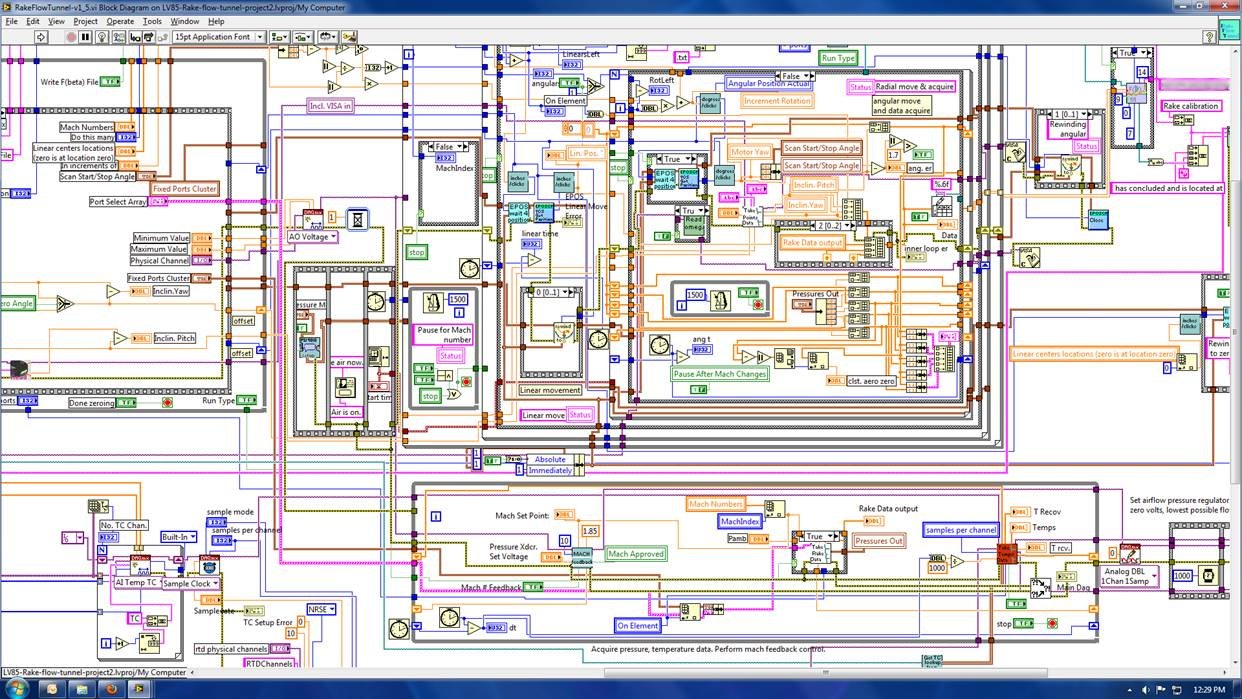
What were once clean flow charts can easily grow into massive yarn tangles of complexity. They are quite a bit more difficult to untangle than code. Text is easy to rearrange, to cut and paste around, while trying to move a section of that drawing into a reusable module would take a lot of work: Requiring you to break and redraw a ton of connecting lines, and maybe even re-layout the whole thing.
In reality, the main users of such tools tend to be engineers who are highly technical and for whom the really difficult parts of programming are not an insurmountable challenge, but for whom writing code is just outside their comfort zone. Once in a while, you meet an expert engineer who has composed systems of great intricacy using these tools. To us, it inspires an odd mixture of admiration and pity. It's like meeting a backpacker who hiked the entire Appalachian trail, but spent every night shivering under a cotton blanket because he was too intimidated by all the complicated poles and zippers to learn how to set up a tent.
The third kind is what I call a "Code Behind" editor. It is usually something that lets you start out with drag-and-drop sorts of tools to lay out a user interface, and once you've done that, you attach code to wire the different elements together. These can be very useful. In fact, Microsoft and Apple make tools like this, which are used for creating the majority of Windows desktop apps and Iphone apps in the world. They are a convenient way to get started, but by the time the project grows to an industrial-sized app, the part laid out in the drag-and-drop tool becomes a small portion of the project's complexity. It starts to look like a broken-down pair of training wheels hanging off the rear of Lance Armstrong's bike.
Provably Correct
Interestingly, towards the end of the article, the author pivots towards the opposite extreme of the difficulty spectrum, from WYSISYG software builders to provable program correctness. This is another approach which has been around for a while. It's generally been out of favor, because
A) It's not possible for most programs. One of the most famous proofs of computer science demonstrates that most complicated computer programs are not possible to prove correct or incorrect. Therefore it's only usable for a limited subset of algorithms
B) Even where it's possible, it's complicated and expensive to prove pieces of code correct, beyond what's worthwhile for most software.
C) The proofs themselves are complicated enough that experience has typically shown them to be more error-prone than the code they are trying to prove.
Now, it sounds like the TLA+ tool he describes makes some progress towards lowering the difficulty of proving code. Though, quotes from the inventor to the effect that TLA+ hasn't reached a wider audience because "Very few programmers - and including very few teachers of programming - understand the very basic concepts [of set theory and formal logic] and how they're applied in practice." leave me skeptical that it makes it that much easier.
Who Shall Watch the Watchmen?
But there's an even deeper problem here. A lot of the article is written with the implicit assumption that software is built (or ought to be built) in a process of "Non-technical business people design this program as a long document of plain-English requirements and flowcharts, and then the programmers translate that into code". It then assumes that most of the errors come due to the the programmers misunderstanding the requirements or failing to translate them correctly, and these errors can be addressed by proving that the code faithfully implements the requirements.
What's at least as common is that the requirements are mistaken or incomplete. They were an attempt to do programming in plain English and flowcharts, which are clumsy tools for programming. Such requirements documents tend to be riddled with errors and ambiguities, because they make an age old mistake: The requirements writers were trying to imitate a computer with their heads, to simulate the entire program in their imaginations.
Agility
I think there is a way to address these problems, but it's not an easy answer of making programmers use different tools. It's to move away from that entire idea of business people writing requirements documents, and handing them to programmers to translate into code. Instead, the dividing line between business people and technical people needs to be broken down. What needs to replace it is better communication and better understanding. Non-programmers involved in software creation need to understand the craft of programming at least well enough to get the difference between modular and non-modular code. Otherwise, programmers find themselves under constant pressure to add quantifiable features, and not waste time on technical mumbo-jumbo. Programmers, on the other hand, cannot be content to lose themselves in the world of code for weeks and months at a time. Rather than taking the requirements document and coming back after months of work with a finished product, it works far better if they immediately build the simplest product that can possibly work (Sometimes called the "Minimum Viable Product"). What begins then is a long process of back and forth conversations with everybody involved in the project. There are demonstrations of what they have so far. Testing can begin immediately to catch mistakes as soon as possible. There are daily discussions of what is most important to add next, what's working well and what doesn't seem quite right yet. There are some formal processes (sometimes called "Agile" or "Scrum") which codify these reviews on a biweekly basis. I believe that is a step in the right direction, but really many of these things work best when they are allowed to happen spontaneously and informally.
But I think in the middle of the horror of things going wrong with safety-critical systems, there's a deeper point that the article misses. Given how monstrously complex the code inside a Prius is, (And the article seems to hint that it's code with very poor modularity) it's startling how rare it is to have life-threatening failures. And that is due to the great strength of computers: That given the same inputs, they behave exactly the same way every time. If a car crashes because of a faulty weld, the problem can happen again. You need to put more safety checks and inspections in the process for producing every weld that's ever produced in the future. But if a car crashes because of a software bug, and you fix that bug, that bug is fixed in every Prius for all time. We can be very careful with our software, but as long as software is created by humans, it will have bugs. There's no way around that, and no magic tool that can fix that. But by the long slog of careful design, testing, fixing, and testing again, we seem to be able to make systems which are still imperfect, but more reliable than anything we've had before.
Also note, this English description is slightly ambiguous, centering around the word "should". Does it mean that we expect x + 2 to equal 4, but it might turn out to be 5 ("The weather should be nice tomorrow")? That x + 2 is under a moral obligation to equal 4, whether it actually does or not ("You should always tell the truth")? Being humans, we can resolve these ambiguities from the context, but computers have a hard time doing that. ↩︎
Subscribe to Axten Software
Get the latest posts delivered right to your inbox

